
How Cloud-Based Signage Helps Businesses Manage Screens Remotely

If your business uses digital screens in different locations, managing content manually can become tiring very quickly. Updating one screen may be simple, but updating screens across retail outlets, offices, shopping malls, showrooms, campuses, or public spaces is a different story.
This is where cloud-based signage becomes useful. Instead of using USB drives or visiting each screen physically, businesses can upload, schedule, publish, and monitor content from one central system.
For teams that need to update promotions, announcements, event content, directories, menus, or internal messages regularly, cloud-based signage helps make screen management more organised and less dependent on manual work.
At Southpaw, SP Signage is designed to help businesses manage digital signage content more efficiently through a cloud-based system, whether they are managing one screen or multiple screens across different locations.
What Is Cloud-Based Signage?

Cloud-based signage is a digital signage setup that allows screen content to be managed through an online platform, often called a content management system (CMS).
Instead of saving content to a USB drive and plugging it into each screen, users can upload content online, organise it into playlists, schedule when it appears, and publish it remotely.
In simple terms, cloud-based signage helps businesses control:
What content appears on each screen
When the content appears
Which screen or location displays it
Who can manage or approve the content
Whether the screen is playing content properly
This matters because digital signage is not only about the screen itself. The software behind the screen is what makes content easier to manage, update, and control. The Digital Signage Federation describes content management or software as an essential part of a digital signage network because it connects messages and media with screens or groups of screens.
For businesses that need a more organised way to manage screens, cloud-based digital signage software can help reduce manual updates and keep content more consistent.
Why Remote Screen Management Matters

Many businesses start with one or two screens. At that stage, manual updates may still feel manageable. But as the number of screens grows, manual screen management can quickly become inefficient.
For example, a retail brand may need to update promotions across several outlets. A shopping mall may need to update tenant information, event details, or directional content. A corporate office may need to publish announcements across different floors or branches.
Without remote screen management, every update may require someone to visit each screen or media player physically. This can lead to delays, inconsistent content, outdated visuals, and unnecessary operational work.
Remote screen management helps businesses keep content updated from one place. It also gives marketing teams, operations teams, and administrators better control over what is displayed across different screens.
This is especially useful for:
Retail chains
Shopping malls
Corporate offices
Education spaces
Showrooms
Healthcare facilities
Public venues
Event spaces
Multi-branch businesses
The more screens and locations a business has, the more valuable remote management becomes.
How Cloud-Based Signage Works

Cloud-based signage usually works through a central online dashboard. This dashboard allows users to manage the content that appears on digital screens.
The process is usually simple.
First, the user uploads content such as images, videos, slides, announcements, menus, promotions, or event updates into the system. Then, the content can be arranged into playlists or campaigns.
After that, the user can schedule the content based on time, date, screen, location, or campaign period. Once everything is ready, the content can be published remotely to the selected screens.
A cloud-based signage workflow may look like this:
Upload content to the signage CMS
Arrange content into playlists or campaigns
Choose the screen, location, or screen group
Schedule the content by date and time
Publish the update remotely
Monitor whether screens are online and playing correctly
This makes content management much easier compared to manual USB updates, especially when screens are located in different places.
Key Benefits of Cloud-Based Signage for Businesses
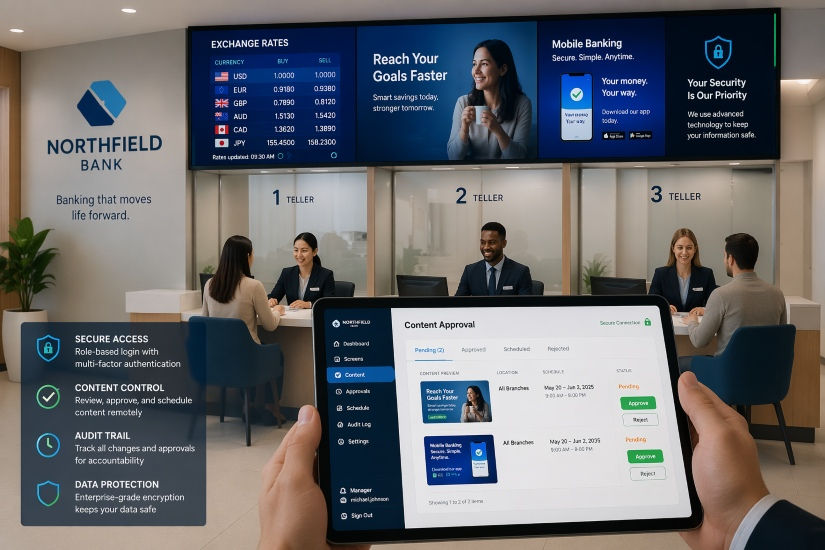
Cloud-based signage is useful because it helps businesses manage content with more control, flexibility, and visibility.
Update Content Without Visiting Each Location
One of the biggest benefits of cloud-based signage is that content can be updated remotely.
This means your team does not need to visit each screen physically whenever there is a new promotion, announcement, menu update, or event message.
For businesses with multiple branches or screens, this can save a lot of time and reduce operational friction.
Schedule Campaigns in Advance
Cloud-based signage allows businesses to prepare content ahead of time.
For example, a retail team can schedule festive promotions in advance. A mall can schedule event announcements for a weekend campaign. A school or office can schedule notices based on the day or time.
This helps teams stay organised and reduces the risk of last-minute updates.
Keep Branding Consistent Across Screens
When screens are managed manually, it is easy for different locations to display outdated or inconsistent content.
Cloud-based signage helps businesses maintain better brand consistency by allowing approved visuals, messages, and campaigns to be managed from one central system.
This is useful for brands that need the same campaign to appear across multiple outlets or departments.
Monitor Screen and Device Status
Cloud-based signage can also help teams monitor screen or device status.
This is useful because a screen may appear installed, but the content may not be playing properly. Remote monitoring helps teams detect issues faster and respond before the problem affects visitors, customers, or staff.
For larger screen networks, this visibility becomes important because it helps reduce downtime and improves reliability.
Improve Campaign Visibility with Proof of Play
Proof of play helps confirm whether specific content was displayed on a screen.
This is useful for advertising campaigns, tenant promotions, retail content, internal communication, or any situation where teams need confirmation that content has actually played.
For example, a mall may want to confirm that a tenant promotion was displayed during a campaign period. A retail brand may want to check whether a product promotion was shown across selected outlets.
Proof of play gives teams better visibility over campaign delivery.
Common Business Use Cases for Cloud-Based Signage
Cloud-based signage can support many types of businesses and environments.
Retail Stores
Retail businesses can use cloud-based signage for promotions, product highlights, seasonal campaigns, new arrivals, pricing updates, and brand storytelling.
Instead of updating each outlet manually, the head office or marketing team can manage content centrally.
Shopping Malls
Shopping malls can use cloud-based signage for directories, tenant promotions, campaign announcements, event schedules, and visitor guidance.
For malls that need interactive wayfinding, Southpaw also offers a digital mall directory and shopping mall signage solution with QR code mobile directions, allowing visitors to continue viewing directions on their phone after scanning the route.
Corporate Offices
Corporate offices can use digital signage for internal announcements, meeting room updates, HR notices, visitor welcomes, safety reminders, and company news.
Cloud-based management makes it easier to update content across different floors, departments, or branches.
Education Spaces
Schools, colleges, universities, and training centres can use cloud-based signage for timetables, event updates, emergency notices, student announcements, wayfinding, and campus communication.
Showrooms
Showrooms can use digital signage to display product demos, brand videos, interactive presentations, customer testimonials, and campaign content.
This helps create a more engaging environment for visitors and potential buyers.
Healthcare and Public Spaces
Hospitals, clinics, government offices, and public venues can use digital signage for queue information, visitor guidance, announcements, safety messages, and service information.
In these environments, clear communication can improve visitor flow and reduce confusion.
Cloud-Based Signage vs Manual USB Updates
Manual USB updates may be enough for a very simple single-screen setup. However, for businesses that need flexibility, scheduling, and multi-screen control, cloud-based signage is usually more practical.
Feature | Manual USB Updates | Cloud-Based Signage |
Content updates | Must update on-site | Update remotely |
Multi-screen control | Difficult to manage | Easier to manage centrally |
Scheduling | Limited | Schedule by time, date, screen, or location |
Monitoring | Usually unavailable | Can monitor screen and device status |
Campaign control | Manual and slower | More organised and consistent |
Best for | Simple one-screen usage | Businesses with multiple screens or frequent updates |
The main difference is control. Manual updates depend on physical access, while cloud-based signage gives businesses more flexibility to manage screens from anywhere.
When Should a Business Use Cloud-Based Signage?
A business should consider cloud-based signage when screen content needs to be updated regularly or managed across multiple locations.
It may be suitable if:
You manage more than one screen
You have multiple outlets or branches
Content changes often
Promotions need to be scheduled in advance
Screens are difficult to access physically
Teams need better control over branding
Proof of play or playback reporting is needed
You want to reduce manual USB updates
You need to monitor screen performance remotely
Your business plans to scale its screen network
Cloud-based signage is especially useful when digital screens become part of your daily communication or marketing operations.
What to Look for in a Cloud-Based Signage System

Not every signage system works the same way. Before choosing a cloud-based signage solution, it helps to understand what features are useful for your business.
A good system should support:
Easy content upload
Playlist creation
Content scheduling
Remote publishing
Multi-screen management
Screen grouping
User permissions
Media format support
Device monitoring
Proof of play
Performance visibility
Scalability for future screens
Local technical support
The right system should make content management easier, not more complicated. It should also fit the way your team works, whether the screen network is managed by marketing, operations, IT, or a facilities team.
How SP Signage Supports Remote Screen Management

SP Signage is Southpaw’s cloud-based signage solution for businesses that need a better way to manage digital signage content.
It helps users manage content, scheduling, broadcasting, and screen monitoring from a central system. This makes it suitable for businesses that need to control one screen, several screens, or a wider screen network across different locations.
SP Signage can support use cases such as:
Retail promotions
Mall directories
Event announcements
Corporate communications
Education notices
Showroom content
Public information screens
Tenant advertising
Campaign scheduling
For businesses that need more control over content updates, playback visibility, and screen management, SP Signage provides a more organised way to manage digital signage operations.
Manage Your Screens More Easily with SP Signage

Cloud-based signage helps businesses reduce manual updates, improve content consistency, schedule campaigns more easily, and monitor screen activity from one central system.
For teams managing multiple screens or frequently changing content, this can make digital signage much easier to operate.
If you are looking for a better way to manage your signage content remotely, explore SP Signage by Southpaw and find out how cloud-based signage can support your business.
Frequently Asked Questions
What is cloud-based signage?
Cloud-based signage is a digital signage system that allows businesses to manage screen content through an online platform instead of updating screens manually on-site.
Can I manage multiple screens remotely?
Yes. A cloud-based signage CMS can help businesses manage content across multiple screens or locations from one central platform.
Is cloud-based signage better than USB updates?
For businesses with multiple screens or frequently changing content, cloud-based signage is usually more efficient because updates can be scheduled and published remotely.
What type of content can be shown on cloud-based signage?
Businesses can display promotions, videos, images, announcements, menus, directories, event updates, wayfinding content, internal messages, and public information.
Who should use cloud-based signage?
Cloud-based signage is useful for retail stores, shopping malls, offices, schools, showrooms, healthcare spaces, public venues, and businesses with multiple screens.
Does cloud-based signage need internet access?
Internet access is usually needed to publish updates and manage content remotely. Some systems may continue playing previously downloaded or cached content if the internet connection is temporarily interrupted, depending on the setup.


Comments