
Self-Service Kiosk vs Information Kiosk: Which One Do You Need?

If you're researching interactive kiosks for your business, you'll quickly run into two terms that are used almost interchangeably: self-service kiosks and information kiosks. They're related, but they're built to solve different problems. A self-service kiosk lets you complete a transaction, order, pay, and check in. An information kiosk lets you find something in a store, a direction, or a piece of information. Knowing which one you actually need (or whether you need both) will shape everything from the hardware you choose to the peripherals you'll need to budget for.
What Is a Self-Service Kiosk?
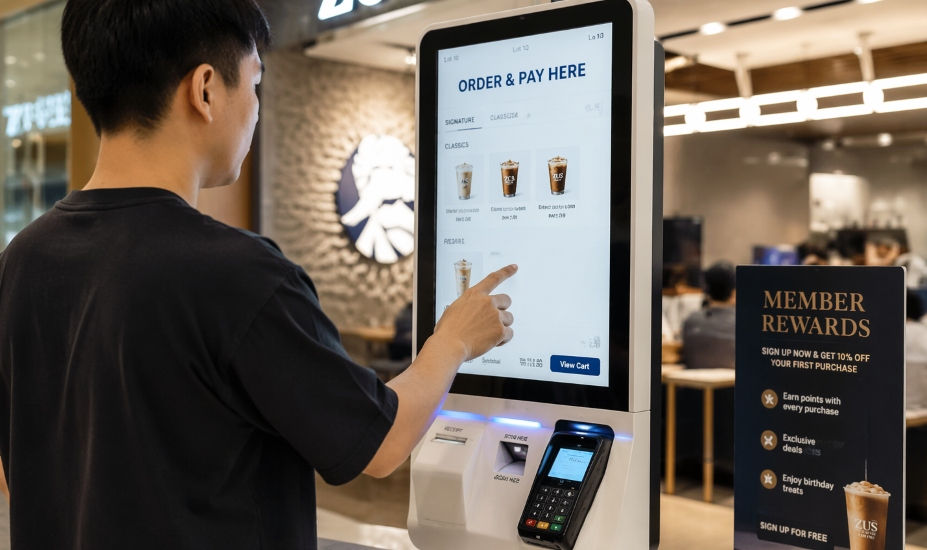
A self-service kiosk is built around a transaction. Someone walks up, completes a task that would normally require a staff member, and walks away, order placed, bill paid, appointment confirmed.
You'll typically find self-service kiosks doing this kind of work:
F&B self-ordering: Where customers build their own order and pay at the kiosk before it's sent straight to the kitchen.
Retail self-checkout: Where shoppers scan and pay for items without a cashier.
Healthcare check-in: Where patients confirm their details and join a queue without speaking to front-desk staff.
Hotel check-in: Where guests verify a booking and, in some setups, receive a room key directly from the kiosk.
Ticketing: Where visitors collect or print a pass without queuing at a counter
Because a self-service kiosk is built for transactions, it usually needs more peripherals than an information kiosk, a receipt printer, a card reader or QR payment scanner, and sometimes a barcode scanner. These add to both the build cost and the planning involved.
What Is an Information Kiosk?

An information kiosk is built around lookup, not transactions. Nobody's paying for anything at all, they're trying to find something or learn something.
Common settings for an information kiosk include:
Shopping mall and building directories, where visitors search for a tenant, view a floor plan, and get directions.
Visitor centres and corporate lobbies, guiding people to the right floor, room, or department.
Museums and exhibitions, providing deeper context, video content, or a suggested route through a space.
Campus wayfinding, helping students and visitors find buildings, schedules, or events.
An information kiosk's software priorities are different too — a clear, searchable interface matters more than payment integration, and it rarely needs the same level of peripheral hardware a transactional kiosk does.
Self-Service vs. Information Kiosk: Side by Side
Differences | Self-Service Kiosk | Information Kiosk |
Main purpose | Complete a transaction | Find information or navigate a space |
Typical peripherals | Printer, card reader, scanner | Usually screen-only |
Common settings | F&B, retail, healthcare, hospitality | Malls, lobbies, museums, campuses |
Software priority | Payment & transaction flow | Search & wayfinding clarity |
Content updates | Menu, pricing, promotions | Directory listings, floor plans, announcements |
Which One Do You Actually Need? Ask Yourself These Questions
Is the goal to speed up a transaction, or to help someone find something?
This is the real fork in the road. If you're trying to reduce queues at a counter, you need a self-service kiosk. If you're trying to reduce the number of people asking your staff "where is...", you need an information kiosk.
Does your use case involve money changing hands?
If yes, you're looking at a self-service kiosk, and you'll need to budget for the peripherals and payment integration that come with it. If visitors are only browsing or searching, an information kiosk is the simpler and cheaper build.
How often does your content change?
A self-service kiosk's content (menus, pricing) often changes more frequently and needs tighter integration with your POS or backend systems. An information kiosk's content (directory listings, floor plans) usually changes less often but still benefits from remote content management.
Could you actually need both?
This is more common than people expect. A retail brand activation, for example, might use a kiosk primarily to inform and engage shoppers about a product, closer to an information kiosk in spirit, while still offering a path to purchase. A mall directory might also carry promotional content for tenants alongside its core wayfinding function. The right answer for many businesses isn't strictly one or the other, but a kiosk configured to lean toward one function while still supporting the other.
Choosing the Right Configuration for Your Business
We've built kiosks across both ends of this spectrum for clients in Malaysia, from directory-style installations like our work at The Curve in Petaling Jaya, to more engagement-led, product-focused activations like our Eucerin "Scan and Learn" deployment. You can see both of these, along with our other past work, in our project gallery.
Different goals, different configurations, but built on the same underlying hardware and design principles. The right starting point is always the same question: what do you want the person standing in front of the kiosk to actually walk away from? Once that's clear, the rest of the decision peripherals, software, and content structure tend to follow naturally
Still Not Sure Which One Fits Your Business?
If you're still weighing this up, the honest answer is that the right configuration depends on your specific space, traffic, and goals, which is exactly the kind of thing worth a quick conversation rather than guessing. For a full breakdown of kiosk form factors, touch technology, and components, see our Interactive Kiosk, Self-Service Kiosk & Information Kiosk Solutions in Malaysia, or reach out for a free consultation, and we'll help you figure out the right fit.


Comments